The open source HTTP proxy.
See everything. Debug anything.
Intercept HTTPS traffic with a local CA, inspect every request from your terminal or a live web dashboard, and replay requests to prove a fix worked. Free and open source.
npx laurel-proxyIntercept Every Request
Your dashboard makes 47 API calls on load. Three of them fail intermittently. Laurel Proxy captures every request with full headers, body, and timing. Filter by status, method, or path to find the culprit in seconds.
Read docs: CLI Reference →HTTPS Interception
That iOS app doesn't have public API docs. Point your device at Laurel Proxy, trust the CA, and watch every encrypted request in cleartext. See exactly what endpoints it hits, what tokens it sends, what data it returns.
Read docs: HTTPS Setup →AI Agent Integration
Tell your AI agent "the user update endpoint returns 422." It queries Laurel Proxy, inspects the request body, sees the validation error, fixes your code, replays the request, and confirms the fix. You watch.
Read docs: AI Agent Plugin →Request Replay
Captured the failing request in staging. Replay it against your local server with one command. Modify headers, change the body, hit it again. Iterate until the fix works without touching the frontend.
Read docs: API Reference →Bandwidth Throttling
Your app looks fine on office WiFi and falls apart on a customer's spotty 4G. Apply a preset or exact down/up/latency values, and every connection through the proxy shares that simulated pipe — concurrent requests queue and slow down exactly like they would on a real constrained link.
Read docs: Throttle Command →WebSocket Capture & Replay
Real-time features don't fit the request/response model your other tools assume. Laurel Proxy records the handshake like any other request, decodes every frame in both directions, and replays the whole exchange to reproduce a bug that only shows up mid-connection.
Read docs: Messages Command →Every request, one click away
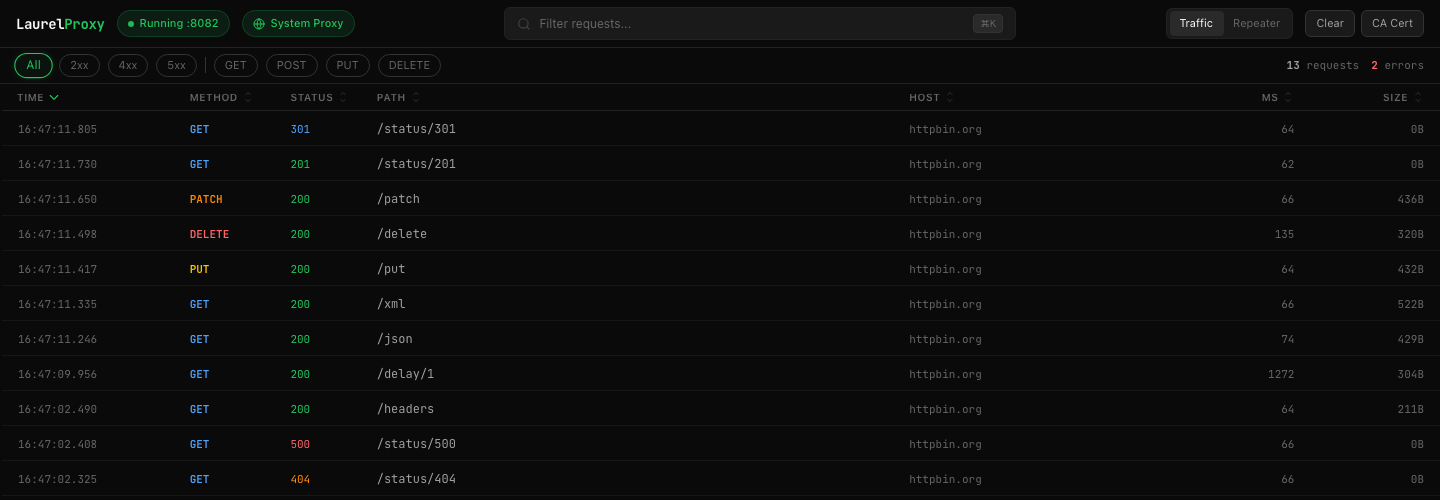
A real-time dashboard for inspecting all HTTP and HTTPS traffic passing through the proxy. Filter, sort, drill into details, and replay requests without leaving the browser.
Real-time streaming
Requests appear as they happen. No refresh, no polling. SSE-powered live updates.
Filter & search
Narrow by status code, HTTP method, host, or URL path. Combine filters for precision.
Request detail panel
Click any row to inspect full headers, response bodies, timing, and protocol details.
Repeater
Grab any captured request, edit the method, URL, headers, or body, and resend it.
cURL export
One-click copy of any request as a cURL command. Share with teammates or script it.
System proxy toggle
Route all macOS HTTP/HTTPS traffic through the proxy with a single click.
A request builder that starts from real traffic
Most API clients start with an empty form, so you rebuild a request that already happened. The Repeater starts from the one you captured, keeps the original response alongside it, and tells you whether your change actually helped.

Start from real traffic
Open any captured request and send it straight to the Repeater. Method, URL, headers, and body arrive already filled in.
Change one thing
Edit the header, fix the malformed field, drop the bad parameter. Everything is editable before you resend.
Resend and compare
Cmd/Ctrl+Enter fires the request. The original response travels with it, so the result is scored against what happened the first time.
Every replay is labelled by comparing its status code against the original response:
Open as many tabs as you need. The same comparison is available from the terminal withlaurel-proxy replay <id> --diff.
Programmable by design
Every captured request is available through a REST API. Query traffic, replay requests, stream events in real-time. Build on top of Laurel Proxy with curl, scripts, or your AI agent.
curl "http://127.0.0.1:8081/api/requests?status=500&limit=5"
# → 3 matching requests with full headers and bodiescurl -X POST http://127.0.0.1:8081/api/replay \
-H "Content-Type: application/json" \
-d '{"id": "a1b2c3d4..."}'
# → 200 OKcurl -N http://127.0.0.1:8081/api/events
# event: request
# data: {"method":"POST","status":422,...}curl http://127.0.0.1:8081/api/status
# → {"running": true, "requestCount": 142}AI Agent Debugging
Your agent queries the API, finds the broken request, reads the validation error, fixes your code, replays to verify. You watch.
CI Pipeline Integration
Run your test suite with traffic routed through the proxy. Then query for unexpected 500s, slow requests, or missing headers.
Custom Dashboards
Build your own traffic visualization using the same REST API that powers the built-in dashboard. Stream events via SSE for real-time updates.
Everything at a glance
One proxy. Three interfaces. Full visibility.
HTTP Interception
Capture every request and response passing through the proxy with full headers, bodies, and timing.
HTTPS Interception
Decrypt TLS traffic with an auto-generated CA certificate. See encrypted requests in cleartext.
WebSocket Capture & Replay
Frames are decoded and stored alongside HTTP traffic, filterable and followable live, with connection replay.
Bandwidth Throttling
Six presets or custom down/up/latency values. One shared virtual link, so concurrent connections contend for bandwidth like a real network.
HTTP/2 Support
ALPN negotiates the client hop and the origin hop independently — no flag, no config. Both are recorded and filterable, right down to the mixed-hops case.
Web UI Dashboard
Live traffic viewer with filters, sortable columns, and a full request/response detail panel.
Repeater
Load a captured request into an editable tab, resend it, and score the response against the original.
REST API
Query captured traffic, replay requests, stream events, and control the proxy programmatically.
AI Agent Plugin
Claude Code plugin and skill, plus an agent output format with decoded bodies and error flags.
Replay from the CLI
laurel-proxy replay <id> --diff resends a captured request and reports whether the response improved.
cURL Export
Copy any captured request as a cURL command. Share with teammates or use in scripts.
Real-time SSE Streaming
Subscribe to live traffic events via Server-Sent Events. Build custom dashboards or monitors.
System Proxy
Route all macOS HTTP/HTTPS traffic through Laurel Proxy with one command or one click.
Start capturing traffic in 10 seconds
Free, open source, MIT licensed. Works on macOS and Linux.
npx laurel-proxy